
The first person you hire creates a problem you didn't have when you worked alone: they need access to some of your business, and definitely not all of it. The new assistant should see the calendar. They probably shouldn't see what every client pays you. And under no circumstances should anyone be able to delete a contact list on their second day because a button was where they didn't expect it.
Most small teams solve this by sharing one login and hoping. Flowpera solves it with three roles and a set of switches you control.
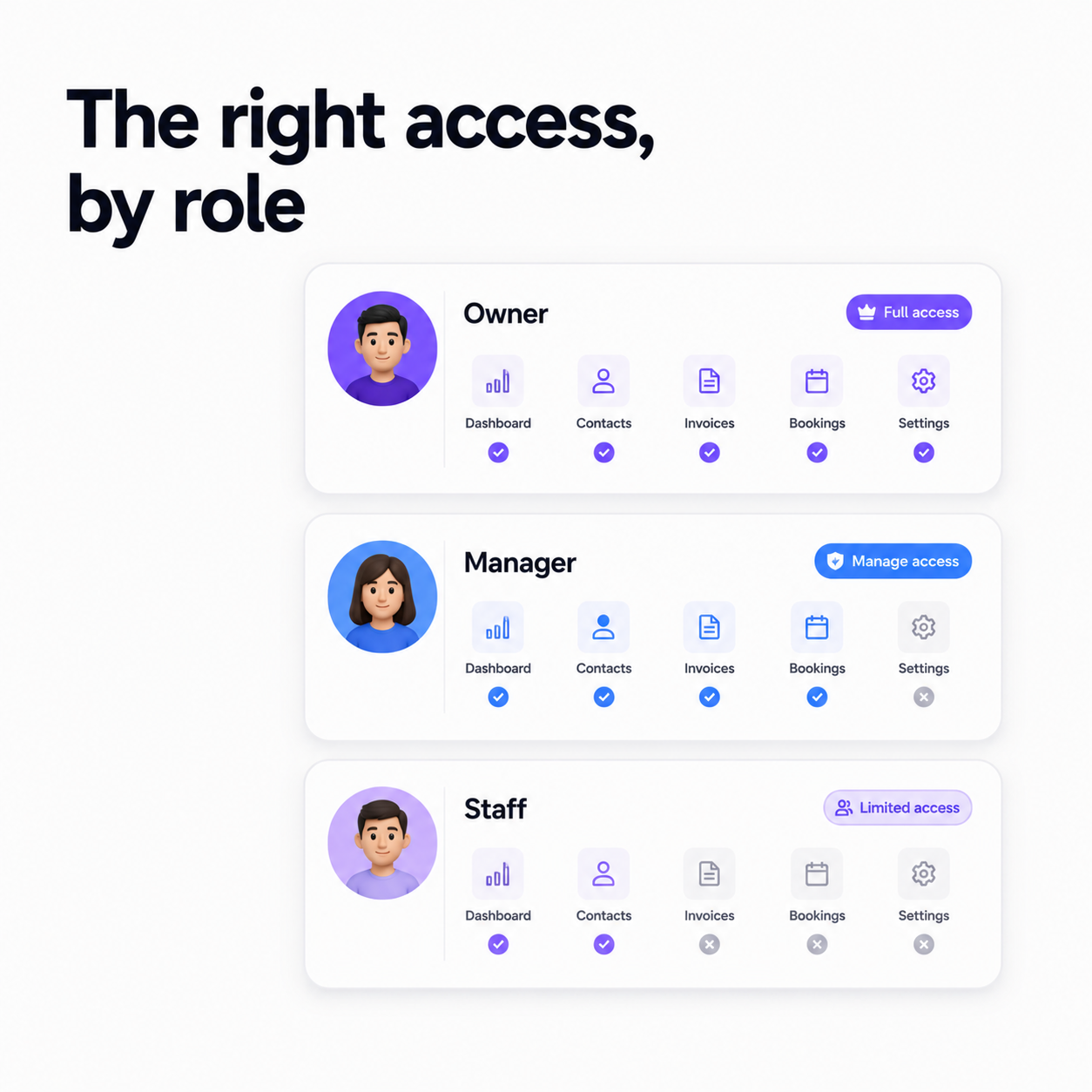
Owner, manager, staff
- 1
Owner
You. Exactly one per workspace, full access to everything, and the only role that can delete anything, anywhere. Deletion being owner-only is a deliberate safety rail: mistakes made by a new team member should always be recoverable.
- 2
Manager
Trusted, senior, and able to read every module by default. What they can create and edit is up to you, module by module. A manager can always see the shape of the business without you having to hand over the keys to it.
- 3
Staff
Sees nothing until you say so. A staff member has no access to a module at all until it's granted — and a grant unlocks reading and writing, never deleting. Start closed, open what's needed.
The modules you grant are the five that hold real business data: booking forms, custom forms, contacts, the calendar and invoices. So your scheduler can be given the calendar and booking forms and nothing else. Your bookkeeper can be given invoices and nothing else. Neither of them has to see the other's work, and neither of them can accidentally destroy it.
Permissions are enforced twice
Access isn't just a hidden button. The rules live in the database itself as well as in the app, so a module you haven't granted isn't merely invisible — the data cannot be read at all. Hiding a link is a design choice; this is a security boundary.
Getting people in
Invite a teammate by email, choose whether they're a manager or staff, and they accept the invitation from their own dashboard — no inbox round-trip, no expired link, no 'I never got it'. Once they're in, you grant modules from the team management page and change them whenever the role changes.
Tasks: work with a name on it
A task in Flowpera has multiple assignees, a due date and time, a priority, tags, a status, and a note the assignee can add as they go. That last one is quietly the most useful field on the card: it's where 'waiting on the client' lives, which is the answer to most of the questions you'd otherwise ask in a standup.
Tasks aren't gated behind a module grant. Everyone on the team can be given work and can see the work they've been given, regardless of which parts of the business they can access — because 'what am I supposed to be doing?' should never require a permission.
Discussions: the conversation next to the work
Discussion channels are group chats you create and manage, with real-time messages and unread counts that follow you across the app. They exist for a specific reason: the context behind a decision usually dies in someone's direct messages, and six months later nobody can remember why the price changed.
Keep the conversation in a channel, next to the customers and invoices it's about, and the answer is still there when you need it.
Everyone lands somewhere useful
A permission model is only pleasant to live with if the app reshapes itself around it. Sign in as a staff member with two modules and you see two modules — the navigation, the dashboard tiles and the 'new' buttons all follow what you're actually allowed to do, rather than teasing you with links that lead to a refusal.
The workspace home is a grid of the numbers that matter — bookings, contacts, forms, entries, team, unread messages — and each tile respects the same rules. Your bookkeeper doesn't see a booking count they can't act on. Your scheduler doesn't see revenue. Everyone opens the app to their own version of the business, which is a surprisingly effective way of keeping people focused.
What tasks look like on a busy week
The pattern worth copying: assign the task to a person, not to a channel; put a real due date on it, not 'end of week'; and let the assignee's note carry the status, so nobody has to interrupt anyone to ask. Priorities and tags are there to make a long list scannable — 'urgent' should mean urgent, and if everything is tagged urgent, nothing is.
When someone leaves
Access that's easy to grant and hard to remove is how businesses end up with former contractors who can still read their customer list. Because every grant is a switch you own, taking one away is as quick as giving it — and since only the owner can delete anything, nothing walks out the door on the way past.
Their tasks and their messages stay where they are, which is what you want. The history of a decision shouldn't disappear because the person who made it moved on. The work survives the person; the access doesn't.
Start closed, open deliberately
The rule we'd suggest is simple: give a new person nothing on day one, then grant the first module the first time they're blocked. It takes ten seconds, it's a conversation you'd have had anyway, and it means access is always something you decided rather than something that accumulated.
It also makes the conversation easier when it needs to happen. 'You don't have access to invoices' is an uncomfortable thing to say to a colleague. 'Nobody starts with access to invoices — tell me when you need it' is just how the company works, and nobody takes it personally.
Team members, roles and module grants are part of every Flowpera plan — the plans differ only in how many seats you get, not in what you're allowed to protect.